一点点前置知识
HTML中常用的内容元素介绍
元素名称
含义
a
链接
ul
无序列表
ol
有序列表
p
段落
h1~6
标题
a:link
用户未访问过的链接
a:visited
用户访问过的链接
a:hover
当鼠标放在上面
a:active
当鼠标点击
CSS中常见的元素属性
属性名称
含义
值
text-align
对齐方式
left / right / center / justify
text-decoration
文字装饰
none / overline / line-through / underline
text-transform
文字格式
uppercase / lowercase / capitalize
font-family
字体系列
说明
margin
外边框
-
border
边框
-
padding
内边框
-
justify-content
调整内容
说明
display
显示容器
flex / block / inline / inline-block
position
定位
static / fixed / relative / absolute / sticky
background
背景
color image repeat attachment position
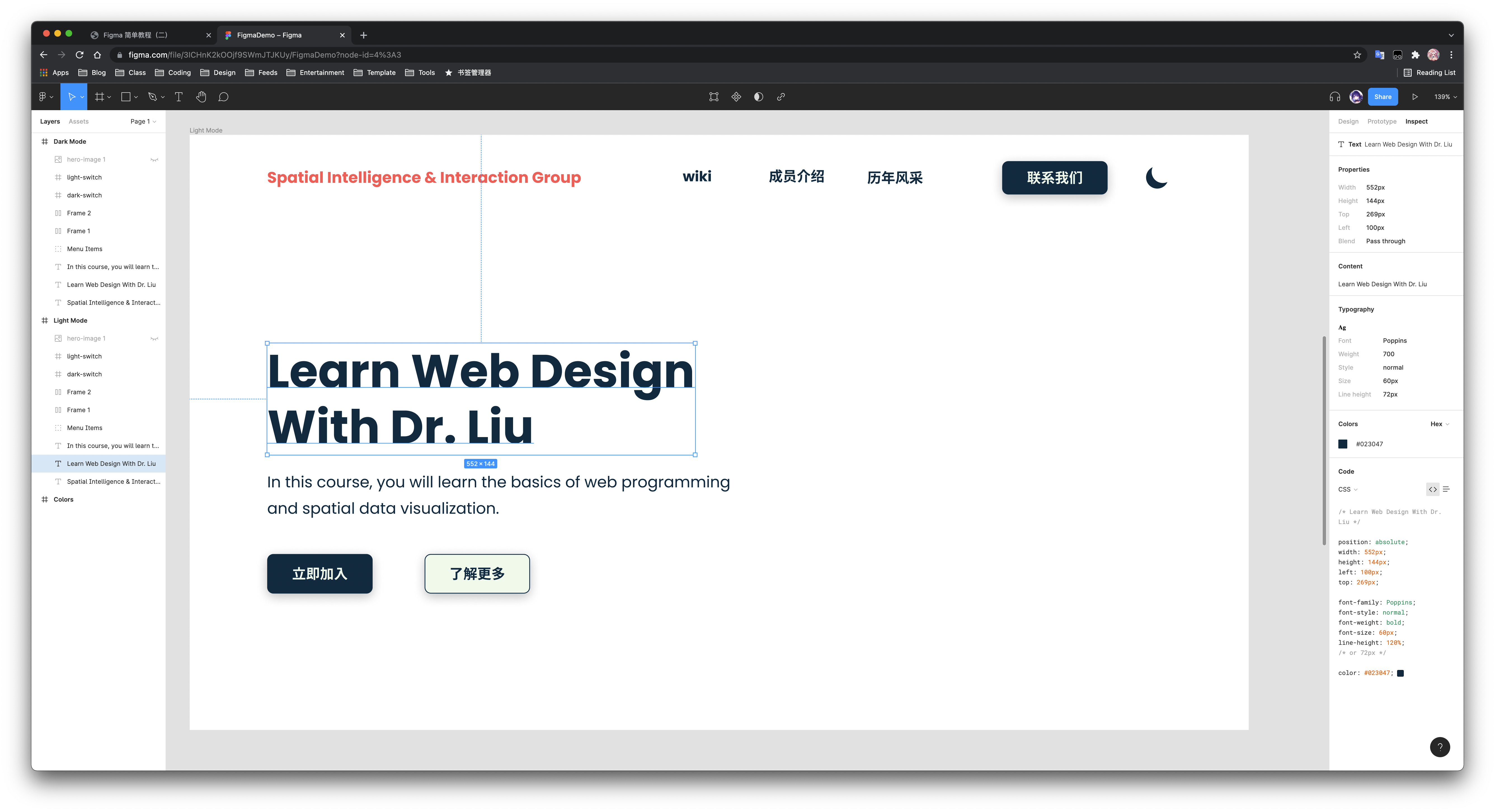
Figma to CSS
示例
Complete index.html code
<!DOCTYPE html>
< html lang = "en" >
< head >
< meta charset = "UTF-8" />
< meta http-equiv = "X-UA-Compatible" content = "IE=edge" />
< meta name = "viewport" content = "width=device-width, initial-scale=1.0" />
< title > Welcome</ title >
< link rel = "preconnect" href = "https://fonts.googleapis.com" />
< link rel = "preconnect" href = "https://fonts.gstatic.com" crossorigin />
< link
href = "https://fonts.googleapis.com/css2?family=Poppins:wght@400;700&display=swap"
rel = "stylesheet"
/>
< link rel = "stylesheet" href = "style.css" />
</ head >
< body >
< div class = "container" >
< div class = "nav-container" >
< div class = "left" >
< div class = "logo" > Spatial Intelligence & Interaction Group</ div >
</ div >
< div class = "right" >
< nav class = "menu-items" >
< a href = "http://47.96.162.114:9009/" > wiki</ a >
< a href = "#" > 成员介绍</ a >
< a href = "#" > 历年风采</ a >
< a class = "btn dark" href = "#" > 联系我们</ a >
</ nav >
< div class = "dark-switch active" >
< img src = "images/dark-switch.svg" alt = "" />
</ div >
< div class = "light-switch" >
< img src = "images/light-switch.svg" alt = "" />
</ div >
</ div >
</ div >
< header class = "hero-section" >
< div class = "left" >
< h1 > Learn Web Design With Dr. Liu</ h1 >
< p class = "sub-heading" >
In this course, you will learn the basics of web programming and spatial data visualization.
</ p >
< div class = "buttons" >
< a href = "#" class = "btn dark" > 立即加入</ a >
< a href = "#" class = "btn light" > 了解更多</ a >
</ div >
</ div >
< div class = "right" >
< img src = "images/2021poster.png" alt = "" />
</ div >
</ header >
</ div >
< script src = "main.js" ></ script >
</ body >
</ html >
Complete style.css code
: root {
--dark : #202957 ;
--light : #CDDEEF ;
--dark-bg : #01141d ;
--light-bg : #ffffff ;
--logo : #F2B82F ;
--shadow : rgba ( 0 , 0 , 0 , 0.25 )
;
}
* {
box-sizing : border-box ;
margin : 0 ;
padding : 0 ;
}
body {
font-family : "Poppins" , sans-serif ;
background : var ( -- light - bg );
height : 100 vh ;
}
body . dark-mode {
--light : #202957 ;
--dark : #CDDEEF ;
--light-bg : #01141d ;
--dark-bg : #ffffff ;
--shadow : rgba ( 255 , 255 , 255 , 0.50 );
}
. container {
width : 1166 px ;
margin : 0 auto ;
}
. nav-container {
display : flex ; /* 元素会挨在一起? */
justify-content : space-between ; /* 让元素均匀分布 */
align-items : center ;
margin-top : 34 px ;
position : fixed ;
width : 1166 px ;
}
. nav-container . logo {
font-size : 20 px ;
font-weight : 700 ;
color : var ( -- logo );
}
. nav-container . left {
text-shadow : 0 px 4 px 16 px var ( -- shadow );
}
. nav-container . right {
display : flex ;
align-items : center ;
}
/* Animation */
. nav-container . menu-items a {
font-size : 18 px ;
font-weight : 700 ;
color : var ( -- dark );
text-decoration : none ;
margin-right : 70 px ;
display : inline-block ; /* inline-block可以让原本垂直显示的元素变成水平显示 */
transition : all 500 ms ;
}
. hero-section . buttons a {
font-size : 18 px ;
font-weight : 700 ;
color : var ( -- dark );
text-decoration : none ;
margin-right : 70 px ;
display : inline-block ;
transition : all 500 ms ;
}
. nav-container . menu-items a : hover {
transform : translateY ( -2 px );
}
. hero-section . buttons a : hover {
transform : translateY ( -2 px );
}
/* 上面两个也可以合并写 */
. nav-container . menu-items a . btn {
padding : 8 px 32 px ;
}
/* Buttons */
a . btn {
box-shadow : 0 px 4 px 16 px var ( -- shadow );
border-radius : 8 px ;
padding : 12 px 32 px ;
text-decoration : none ;
font-size : 18 px ;
font-weight : 700 ;
display : inline-block ; /* inline-block可以让原本垂直显示的元素变成水平显示 */
}
a . btn . dark {
background : var ( -- dark );
color : var ( -- light );
}
a . btn . light {
background : var ( -- light );
color : var ( -- dark );
}
/* Dark/light switch */
. nav-container . dark-switch ,
. nav-container . light-switch {
position : absolute ;
right : 0 ; /* 我想让这个按钮贴边 */
transform : translateY ( -16 px );
opacity : 0 ;
pointer-events : none ;
display : flex ;
transition : all 500 ms ;
}
. nav-container . dark-switch . active ,
. nav-container . light-switch . active {
opacity : 1 ;
cursor : pointer ;
pointer-events : auto ; /* 当处于active状态时才触发点击事件 */
transform : translateY ( 0 );
}
. hero-section {
display : flex ;
align-items : center ;
height : 100 vh ;
justify-content : space-between ;
}
. hero-section h1 {
font-size : 60 px ;
color : var ( -- dark );
line-height : 120 % ;
width : 587 px ;
margin-bottom : 16 px ;
margin-top : 60 px ;
}
. hero-section p . sub-heading {
font-size : 20 px ;
line-height : 170 % ;
color : var ( -- dark );
width : 587 px ;
}
. hero-section a . btn {
margin-top : 20 px ;
margin-right : 67 px ;
}
/*
.hero-section .right {
align-self: flex-end;
}
*/
. hero-section . right img {
vertical-align : middle ;
height : 555 px ;
filter : drop-shadow ( 0 px 4 px 16 px var ( -- shadow ));
border-radius : 10 px ;
}
Complete main.js code
const darkSwitch = document . querySelector ( ".dark-switch" );
const lightSwitch = document . querySelector ( ".light-switch" );
const body = document . querySelector ( "body" );
if ( localStorage . getItem ( "darkMode" )) {
body . classList . add ( "dark-mode" );
darkSwitch . classList . remove ( "active" );
lightSwitch . classList . add ( "active" );
}
darkSwitch . addEventListener ( "click" , () => {
body . classList . add ( "dark-mode" );
darkSwitch . classList . remove ( "active" );
lightSwitch . classList . add ( "active" );
localStorage . setItem ( "darkMode" , "true" );
});
lightSwitch . addEventListener ( "click" , () => {
body . classList . remove ( "dark-mode" );
darkSwitch . classList . add ( "active" );
lightSwitch . classList . remove ( "active" );
localStorage . removeItem ( "darkMode" );
});
Convert Figma to Android
VIDEO